With the introduction of Apple’s public betas for all of its upcoming software later this year, you may now enjoy all that iOS 26 has to offer.
Installing iOS 26 will get you access to certain new Apple Intelligence that may enhance your life in subtle but significant ways, even though the main feature will be Liquid Glass, a comprehensive revamp of the iPhone user experience.
I’ve chosen my top five picks from the list of new AI-powered features that will be included in iOS 26 (and iPadOS 26). There are many reasons to be enthusiastic about the iOS 26 public beta, including the new Apple Intelligence features in Shortcuts and in-app translation.
1. Live Translation

My personal favorite new Apple Intelligence function, after using the iOS 26 developer beta for more than a month, is Live Translation.
With Live Translation integrated into Messages, FaceTime, and the Phone app, you can use AI to fully eliminate language barriers by automatically translating messages, adding translated live captions to FaceTime, and having the translation read out during a phone call.
As I’ve previously discussed, Live Translation has significantly enhanced my communication with my Italian in-laws. If you frequently speak more than one language, you’ll also find this new Apple Intelligence tool to be really helpful.
2. Genmoji and Image Playground upgrades

As part of the initial wave of Apple Intelligence features, the business introduced Genmoji and Image Playground. Since then, it has enhanced its generative AI image capabilities.
Now, users may build new things by combining emojis with descriptions and converting text descriptions into emojis. Additionally, you can modify the facial expressions and personal characteristics of Genmojis created from images of friends and family.
Additionally, Image Playground now supports ChatGPT, giving users access to new styles including vector graphics and oil painting. According to Apple, “users are always in control, and nothing is shared with ChatGPT without their permission.”
My experience using ChatGPT in Image Playground has been enjoyable. It enhances the Image Playground experience and is a positive move for Apple’s creative AI tool, even though it’s still not as strong as some of the other top AI image producers available.
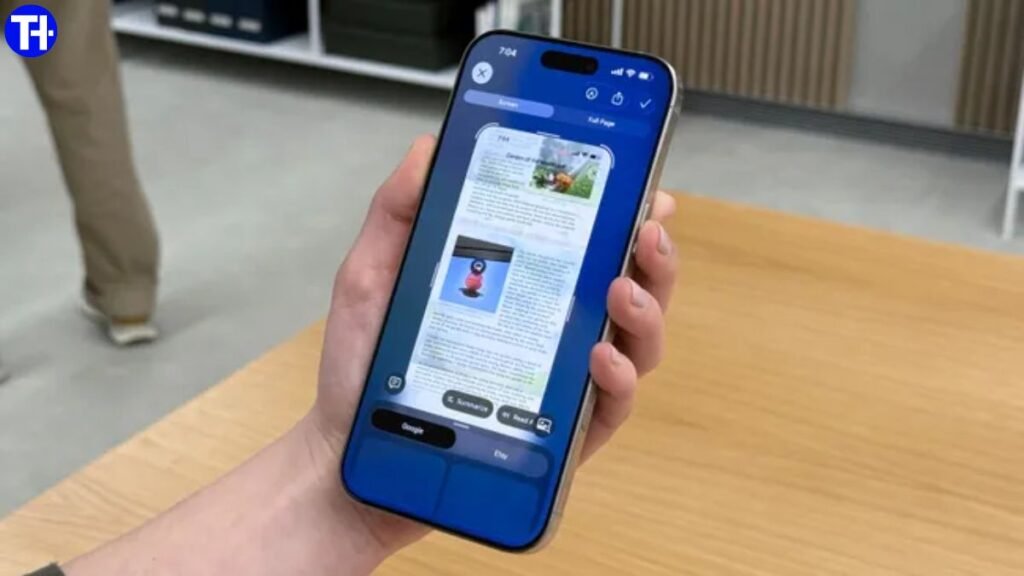
3. Visual Intelligence can now see your screen

The best Apple Intelligence function was previously Visual Intelligence, but the new iPhone 16 AI tool is even better.
With iOS 26, users can search and interact with anything they’re viewing across apps thanks to Visual Intelligence’s ability to scan your screen.
Using Apple Intelligence, you can ask ChatGPT questions about the material on your screen. To utilize this new feature, take a snapshot. In iOS 26, you are now prompted to save, share, or explore further with Visual Intelligence when utilizing the same buttons as a screenshot.
Visual Intelligence on iOS 26 might be the Apple Intelligence feature you’ve been waiting for if, like me, you frequently snap screenshots to help you recall information.
4. Third party apps have Apple Intelligence access

Developers now have access to Apple’s Foundation Models, which is a significant development for the future of Apple Intelligence even if it isn’t technically a feature.
What what does that mean? Fortunately, developers of apps may now “build on Apple Intelligence to bring users new experiences that are intelligent, available when they’re offline, and that protect their privacy, using AI inference that is free of cost.”
At WWDC 2025, Apple presented an example of an educational app that uses the Apple Intelligence paradigm to create a quiz from your notes without charging for an API.
With the potential to leverage Apple’s AI models and enhance the user experience, this framework has the potential to fundamentally alter how we, as consumers, engage with our preferred third-party apps.
5. AI-powered Shortcuts

Last but not least, the Shortcuts app now offers Apple Intelligence. One of the greatest apps available on Apple devices has undergone a significant update that lets users “tap into intelligent actions, a whole new set of shortcuts enabled by Apple Intelligence.”
I’ve experimented with Apple Intelligence-powered shortcuts, and similar to the Shortcuts app, the real potential here will depend on how users utilize this new feature and what they create. As someone who utilizes shortcuts on a regular basis, I’m very interested to see how Apple Intelligence will be used by the amazing community of individuals who make effective shortcuts and share them online.
Although not everyone will use this AI enhancement, if you decide to explore the Shortcuts app and figure out how to get the most of it, this new iOS 26 feature might be the greatest available.
Related posts:
 Apple Siri AI Upgrade May Not Launch at WWDC 2025: Internal Conflicts and Delays Revealed
 iOS 26 Beta 2 Update: Apple Refines Liquid Glass Effect, Adds New Features to Safari, Wallet, Siri, and More
 Elon Musk’s xAI Acquires X (Twitter) in a Game-Changing AI Deal
 ChatGPT Agent shows that there’s a whole new world of AI security threats on the way we need to worry about